


Digital Signage for Retail Stores: A Practical Guide
Digital signage for retail stores means using networked screens, LED panels and kiosks to show promotions, product information and brand content that you can change remotely in minutes rather than reprinting posters. For a South African shop owner, the practical questions are where to place screens, what content to run, which hardware suits the environment, and how to keep the whole system manageable across one or many branches. This guide answers each of those in turn.
Why retailers are moving from print to screens
Retailers are switching because screens let them change a message instantly, test what sells and avoid the cost and delay of reprinting. A promotion that once took a week to design, print and distribute can go live across every branch in an afternoon.
The market reflects this shift. Grand View Research estimates the global digital signage market at USD 31.1 billion in 2025, projecting USD 58.4 billion by 2033 at an 8.2% compound annual growth rate from 2026 to 2033.
There is also behavioural evidence. A survey by Vistar Media and MFour found that 44% of shoppers had made a purchase because of a retail media ad. The same research found that shoppers who viewed ads at a store's front entrance were more likely to buy the advertised product immediately.
The practical benefits for a store owner tend to fall into four groups:
- Speed: update prices, specials and stock messages without waiting on a printer.
- Lower waste: no discarded posters, adhesive residue or last-minute rush orders.
- Flexibility: schedule different content by time of day, day of the week or season.
- Consistency: keep branding identical across every location from one dashboard.
For a deeper look at the commercial case, Signs4SA has published a guide to the benefits of digital signage for retail.
Where to place screens in a store
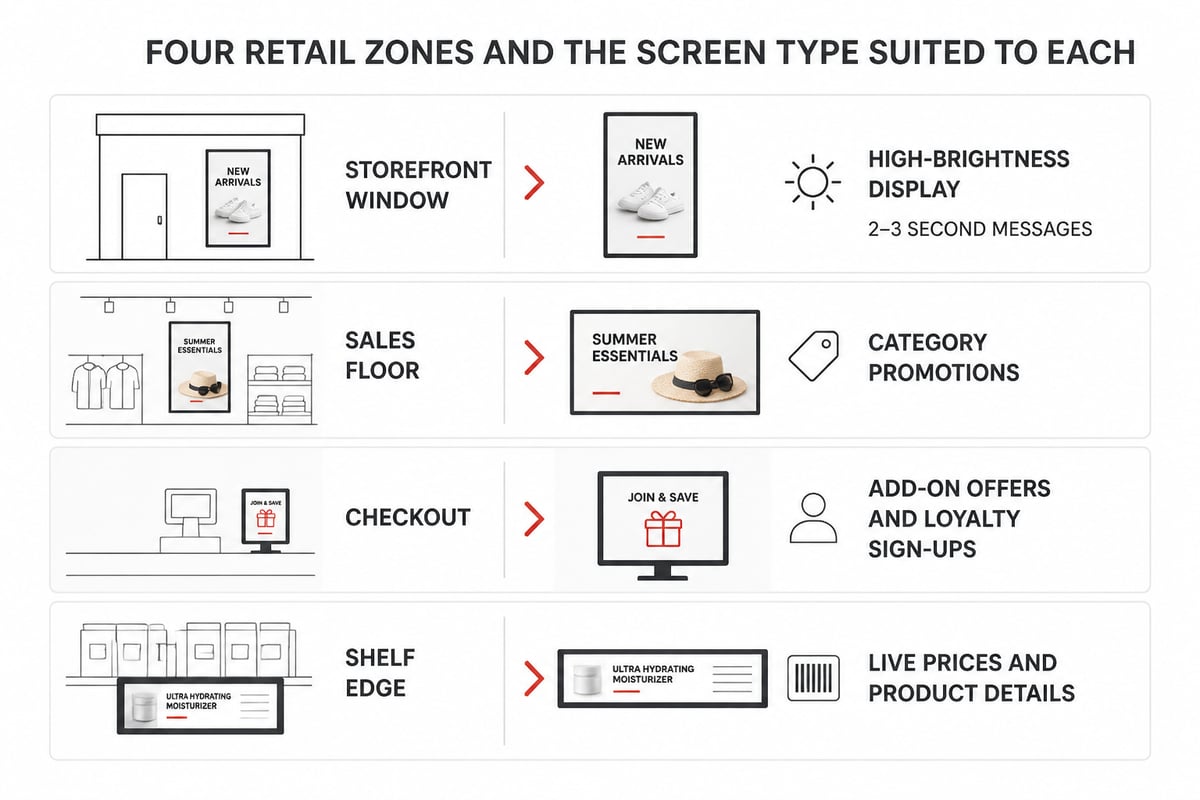
The most effective placement follows the shopper's journey, from the street to the till, with each zone doing a different job. Matching the screen type to the zone matters as much as the content itself.
Storefront and window displays
The window is your first sales opportunity, and it competes with sunlight, glare and passing traffic. Window screens need high brightness, typically far above standard indoor panels, and content that reads in two or three seconds. Mordor Intelligence estimates that window and semi-outdoor retail displays will grow at a 9.22% compound annual growth rate through 2031, which suggests retailers are investing here.
Sales floor
Floor screens work best for category-level messaging: new arrivals, seasonal ranges or brand storytelling. Keep movement purposeful. A looping video that draws the eye to a promotional bay is useful; a screen that distracts from the products themselves is not.
Checkout and queue areas
Shoppers are stationary here, which makes it the best place for longer content. Use it for add-on offers, loyalty programme sign-ups and low-cost impulse lines. Placement at eye level near the till tends to outperform screens mounted high on a wall.
Shelf edge and product displays
Small-format screens and strip displays can show live prices, promotions and product details directly where the buying decision happens. This suits categories where prices change often, such as electronics or grocery.
Wayfinding and kiosks
In larger stores and centres, interactive directories help shoppers find departments and services. If you operate across a multi-level site, the wayfinder digital signage guide explains how these systems are planned.
Choosing the right hardware
The right hardware depends on where the screen sits, how far shoppers stand from it and how bright the surrounding light is. Resolution, brightness and durability are the three specifications that decide most purchases.
For LED displays, the pixel pitch (the P number) determines how close a viewer can stand before the image breaks into dots. A smaller number means a sharper image at shorter viewing distances, and a higher cost. Larger pitches suit distant or outdoor viewing.
| Setting | What to prioritise | Typical consideration |
|---|---|---|
| Indoor sales floor | Colour accuracy, viewing angle | Fine pixel pitch or commercial LCD |
| Shop window | High brightness, anti-glare | Brightness well above standard indoor panels |
| Outdoor or semi-outdoor | Weather protection, heat tolerance | Sealed enclosures and sunlight-readable panels |
| Checkout and shelf edge | Compact size, close-range clarity | Small-format or strip displays |
Indoor placements dominate the market, holding the largest share of retail digital signage in 2025, so most retailers will begin inside the store before extending outward.
Signs4SA's Digital Signage range covers internal and external digital offerings, from P10 to P1.8, which gives retailers a spread of options across viewing distances and environments. Because manufacture, supply and installation are handled in-house, specification and fitting sit with one team. For product-by-product detail, the guide to digital signage products is a useful companion.
Content that works on retail screens
Retail content works when it is short, specific and tied to something the shopper can act on in that moment. A screen filled with a generic brand video earns less than one that names a product, a price and a place to find it.
A few principles keep content effective:
- One message per screen. Shoppers glance; they do not study.
- Large type and high contrast. Check legibility from the furthest realistic viewing point.
- Short loops. A cycle of 10 to 15 seconds per item prevents repetition fatigue for staff who see it all day.
- Time-based scheduling. Run breakfast, lunch or after-work offers at the hours they apply.
- Clear calls to action. "Ask in store", "Scan to join" or "While stocks last" give the message a purpose.
Retailers who run several branches gain further value from templates. A locked layout with fixed logo, colours and fonts lets each store manager change the product and price without altering the brand. This is how you keep digital signage on-brand across locations without routing every change through head office.
Using screens for more than promotions
Screens earn their place when they carry practical information as well. Opening hours, queue guidance, return policies and community notices all reduce questions at the till. In a store with a mix of walk-in and appointment customers, a simple status board saves staff repeated explanations.
Planning for South African conditions
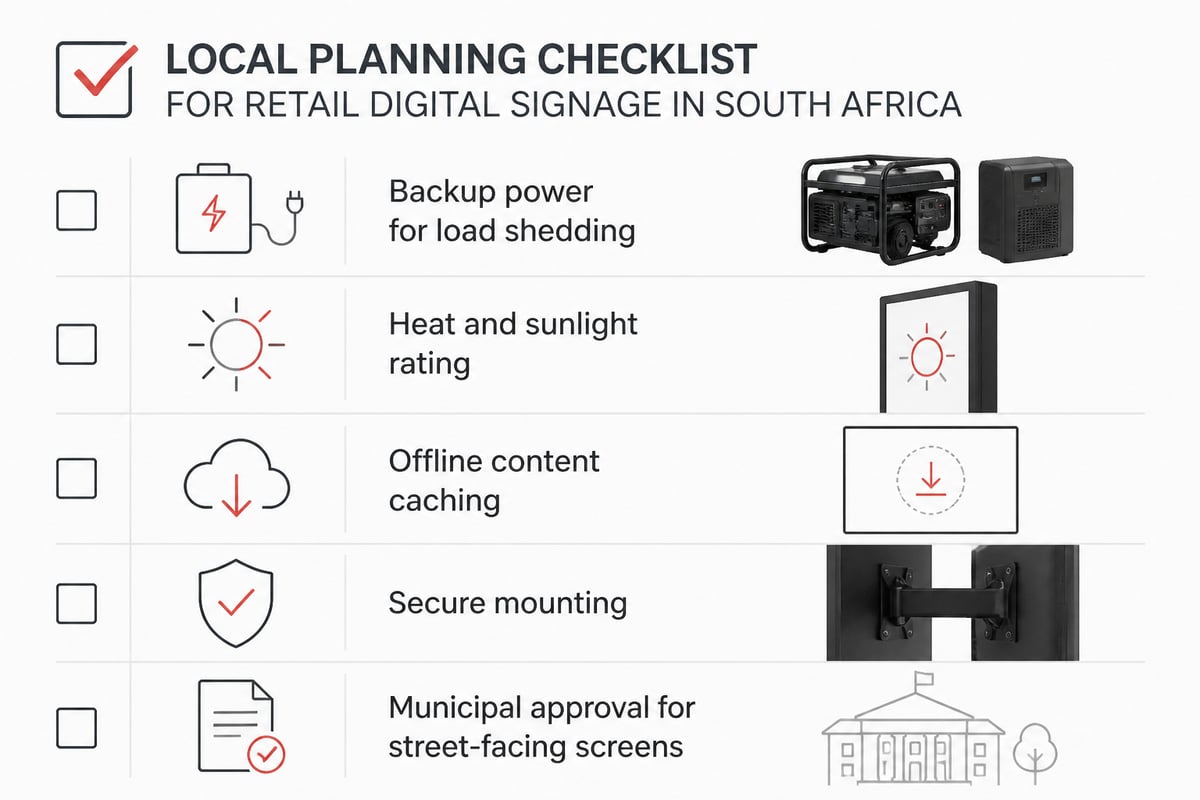
South African retailers need to plan for power interruptions, heat and local regulations before choosing a system. Reliable operation here depends on decisions that matter less in other markets.
- Load shedding: screens and media players should be on a backed-up circuit or a small UPS, so that signage restarts cleanly and does not corrupt content when power returns. Where screens sit outside the backup circuit, choose players that resume playback automatically.
- Heat and sunlight: window and outdoor screens need proper ventilation and a brightness rating suited to direct sun, particularly in the interior and northern provinces.
- Connectivity: if branch internet is unstable, choose a system that caches content locally so that screens keep playing when the connection drops.
- Security: wall mounts, locked enclosures and cable management reduce theft and tampering in high-traffic malls and street-front shops.
- Approvals: external or street-facing screens and pylons may require municipal approval. Signs4SA's notes on council approval for pylons outline how that process is approached.
Checking these points at the planning stage avoids retrofits, which cost more than doing it correctly the first time.
Managing content across one store or many
A content management system (CMS) is the software that controls what each screen shows, and the right one depends on how many screens and locations you run. For one shop with a few screens, a simple cloud-based tool with a media player on each display is usually enough.
Larger groups should look for:
- Remote control of every screen from a single login
- User permissions that separate head office controls from store-level edits
- Scheduling by screen, group, location or time
- Proof of play reporting, which confirms what actually ran and when
- Offline playback so that a dropped connection does not blank the screen
Software choice is often easier once the hardware is settled. If you are weighing platforms, the overview of digital signage suppliers explains what to ask before committing.
Budgeting and measuring return
Budget for the full system, not just the screens, and decide in advance how you will judge whether it paid off. The main cost lines are hardware, mounting and installation, media players, software subscriptions, content creation and ongoing maintenance.
Hypothetical example: a retailer with one window screen, two sales-floor screens and one at the till might start with the window and checkout displays, because those sit closest to the purchase decision. After a trial period, they could review whether the advertised lines sold faster than comparable lines without screen support, then expand to the floor.
Useful measures include:
- Sales uplift on lines promoted by screens versus similar lines without
- Redemption of offers shown on screen
- Time saved by staff on price and promotion changes
- Reduction in print and installation costs for in-store posters
Set a baseline before launch. Without one, any improvement is guesswork. Cost-conscious retailers can also review Signs4SA's page on affordable signage in South Africa when comparing options.
Installation and ongoing care
Professional installation protects the investment, because poor mounting, cabling and ventilation account for many early failures. Screens need correct load-bearing fixings, tidy concealed cabling, adequate airflow and safe access for servicing.
After installation, put a simple maintenance routine in place:
- Check each screen weekly for dead pixels, colour shifts or physical damage.
- Clean screens with appropriate non-abrasive products.
- Review content monthly and retire anything out of date.
- Keep software and player firmware current.
- Log faults and service dates so patterns become visible.
Out-of-date content is one of the most common failures in practice. A screen advertising a finished promotion does more harm than a blank one, so assign a named person to own the schedule.
For further reading on how screens fit into a wider shopfront strategy, see Signs4SA's piece on retail store digital signage.
Frequently asked questions
How many screens does a small retail store need?
Most small stores begin with one to three: usually the window and the checkout area. Start where the screen is closest to a buying decision, measure the result, then add more.
Is digital signage worth it for a single shop?
It can be, particularly where promotions change often or print costs are significant. The case is strongest when you can name the specific lines or offers that the screens will support.
Can digital signage run during load shedding?
Only if the screens and players are on backup power. Planning for this at installation prevents downtime and content corruption.
Does an outdoor screen need approval?
Street-facing or externally mounted displays can fall under municipal signage rules. Check requirements for your site before ordering.
Begin by listing the three spots in your store where a shopper makes a buying decision, then note the viewing distance and lighting at each, as these details will shape your hardware choice. Signs4SA can then advise on specification, since it handles manufacture, supply and installation in-house, with more than 25 years of signage experience. You can browse its Digital Signage range first, and when you are ready to price a project, Signs4SA can help you request a quote for your store.